
AT&T ActiveArmor®
AT&T Services, Inc.Tools
4.228.01K Reviews
- Version
- 8.0-3c955b7
- Installs
- 50.00M
- Age Rating
- Everyone
Screenshots
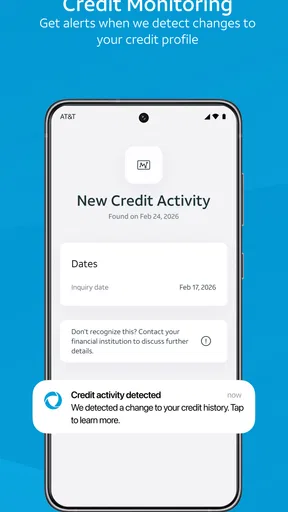
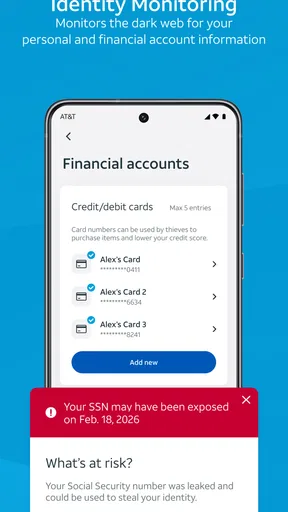
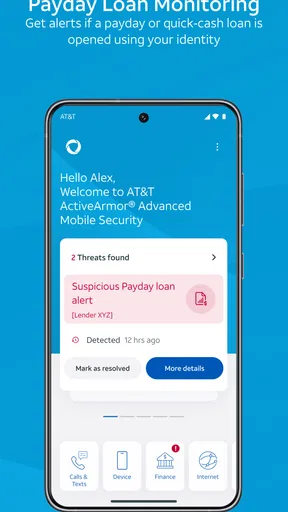
Our Review of AT&T ActiveArmor®
 Analysis by Appyee
I think a phone-security app earns its place when it helps with everyday calls and connections without turning basic phone use into a project. That is the question I kept coming back to while trying AT&T ActiveArmor®: does it give a household a practical extra layer of help, or does it create more settings and alerts to manage? My impression is that it is most useful when the person setting it up knows what they want protected and takes a little time to understand the app’s choices.
One phone, several people, different expectations
Shared devices make security decisions less simple than they first appear. A parent may want fewer nuisance calls, while another adult cares more about suspicious links or using a phone safely away from home. If several people rely on one device, it helps to agree on who will review alerts and decide what to do when something looks wrong. That coordination matters as much as installing another tool.
I would not treat one installation as a household-wide shield. A security app on one phone does not automatically settle the security needs of every other person or device in the home. I’d start with the phone that receives the most unknown calls or travels most often, then see whether the app’s alerts and available protections fit that person’s routine before making it part of a larger household plan.
Setup is simple, but account boundaries still matter
Getting started with AT&T ActiveArmor® was a breeze. After downloading it from the app store, the setup was pretty straightforward. It didn’t bombard me with too many permissions, which is always a relief. The interface is clean and intuitive, so even if you’re not tech-savvy, you’ll find your way around without a hitch.
There is an important distinction between a phone being shared and an account being shared. I would keep the app’s account access and any security decisions tied to the person responsible for that line, rather than casually passing login details around the family. Before setup, I’d also check that the person using the phone understands what alerts mean and who should be contacted if an alert concerns their personal information.
AT&T Services, Inc. makes this free tools app, and it has an average rating of 4.4 from around 85,000 ratings, with more than 10 million installs. It is rated for everyone, although that age label is not a substitute for explaining privacy and scam risks to a young phone user. The current version is 7.6.1-b8be8cb, and the app is available on devices running OS 10 or later. Some in-app items cost between $3.99 and $7.00, so I would check the choices shown in the app before assuming every option is included at no cost.
How it fits into a household’s security routine
When I think about adding ActiveArmor to a household routine, I’d start with the person and phone that face the most unfamiliar calls or travel-related connection risks, rather than installing it everywhere by default. That gives the main user room to learn what its alerts mean and decide which ones are useful. From there, the next question is how to keep setup and account access tied to the right person.
Features that help with everyday decisions
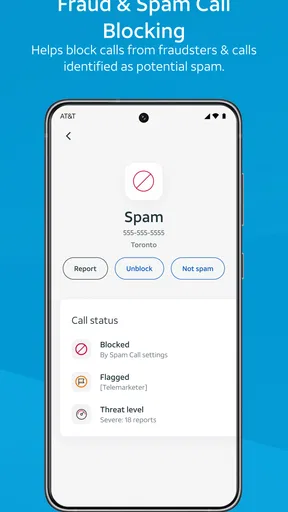
Now, let’s dive into what makes this app tick. First off, the security features are top-notch. AT&T has really gone the extra mile to ensure you’re protected from all angles. Whether it’s blocking spam calls or monitoring for data breaches, this app has got you covered.
In practice, I’d think of these tools as support for decisions, not a reason to stop checking a caller’s identity or reading a message carefully. A spam warning can help me decide not to answer an unfamiliar call, but it cannot establish that every call that gets through is trustworthy. I still prefer to contact a bank, delivery service, or school through a number or app I already know if a message asks me to act quickly.
Public Wi-Fi and the small print of convenience
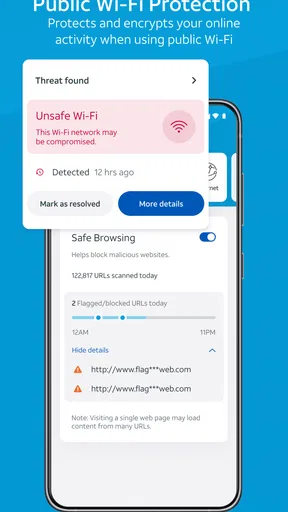
The Wi-Fi protection feature is a lifesaver. It ensures that your connection is secure, especially when you’re out and about using public Wi-Fi. I could literally feel the peace of mind when I was sipping coffee at a local café, knowing my data wasn’t floating around in the wild.
My practical tip is to treat a protection notice as a prompt to pause, especially before signing in to an account or handling something sensitive away from home. I would not assume that a security app makes every public network safe or replaces careful browsing. When a task can wait until I’m on a trusted connection, waiting is still the simpler choice. That is a useful trade-off: extra guidance can reduce uncertainty, but it should not encourage riskier habits.
Alerts, personal information, and who handles them
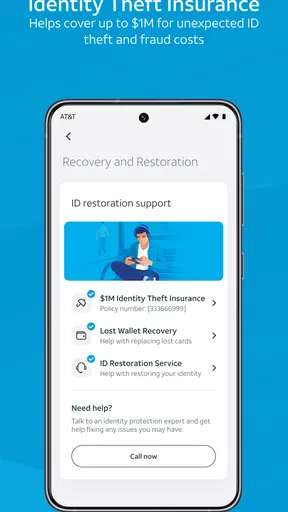
Another cool aspect is the Identity Monitoring. It actively scans for your personal info on the dark web. Creepy, right? But also super necessary in today’s digital age. I got a quick alert when there was a potential threat, and it guided me through the steps to rectify it.
For a shared phone, I would decide in advance whose information is being monitored and who is allowed to see an alert. A notification about personal details can be sensitive even within a family. If a teenager uses a parent’s phone, for example, the adult should explain that an alert may need attention without implying that monitoring is a replacement for a conversation about privacy. The useful workflow is to read the alert, identify the affected person, and follow the suggested response rather than forwarding it around without context.
Monitoring also has a natural limit: it can tell you about a potential exposure, but it cannot make a compromised password safe by itself. I would use an alert as a reason to review the relevant account and take sensible account-security steps. That keeps the app in its proper role as a helpful warning system, rather than treating it as a complete solution to identity risks.
A calmer experience, with a few things to check
In terms of user experience, AT&T ActiveArmor® does a pretty solid job. The app doesn’t slow down my phone, which is a huge win. I’ve had apps in the past that turned my phone into a snail, but thankfully, this isn’t one of them.
Navigating through the app is seamless. Everything is organized neatly into sections, so you don’t have to dig through menus to find what you need. The alerts and notifications are timely but not overwhelming, which is a balance many apps fail to strike.
Even with a tidy interface, I would spend a few minutes checking which alerts are enabled and what each one is asking me to do. That is especially worthwhile on a phone used by someone who is not comfortable with security prompts. A household can avoid confusion by agreeing that an unexpected alert should be checked in the app, not acted on through a call or message that happens to appear at the same time.
If notifications become distracting, I would review the available settings rather than switching off every warning immediately. The goal is to keep the alerts that help the phone’s main user make a decision and reduce the ones they do not understand or need. This small bit of setup is more useful than installing the app and assuming it will make good choices on everyone’s behalf.
Where it sits beside other security options
Compared with relying only on a phone’s built-in call screening or general device settings, ActiveArmor brings call-related protection and other security tools together in an app associated with AT&T. That makes it a reasonable place to start for an AT&T customer who wants a single, accessible way to review several kinds of mobile-security help. It is different from a password manager, which focuses on storing and organizing login credentials, and it should not be treated as a substitute for one.
There is also a sensible case for choosing a specialist alternative. If your main concern is managing passwords across several services, a dedicated password manager is more directly suited to that job. If you already rely on your phone’s built-in screening and want no additional account or settings to manage, the default tools may be enough for your needs. I would choose ActiveArmor for the particular mix of mobile protections it offers, not because one app can replace every security habit or tool.
Age, trust, and a realistic routine
A realistic household use case is a family member who gets repeated unfamiliar calls while commuting and sometimes uses café Wi-Fi. I’d help them install the app, explain that a warning is a reason to verify rather than panic, and agree that they can ask me to look at a confusing alert. If the phone belongs to another adult, I would keep that person in control of their account and decisions. This is coordination, not a reason to share private credentials.
The everyone age rating indicates a broad audience, but I would still guide a younger user through what a scam call or suspicious notice might look like. A child should know that they can ignore pressure to share codes or personal information and ask a trusted adult for help. The app can support those habits, but it does not replace them or create family controls by itself.
That distinction is why I would skip this app for someone who expects a hands-off service to prevent every scam, or for a household that is not willing to discuss account boundaries and alerts. I would also hesitate to add it to a shared phone if nobody can say whose personal details or account the security notifications relate to. A clear owner and a simple plan for reviewing alerts make the experience more useful.
Who should try it, and what to expect
So, is AT&T ActiveArmor® a must-have? If you’re already an AT&T customer, I’d say it’s a no-brainer. The integration is smooth, and having that extra layer of security on your device is invaluable. Even if you’re not with AT&T, you might still find the features beneficial, especially if you’re concerned about online privacy.
For those who are always on the go or use public Wi-Fi frequently, the protection this app offers is worth considering. It’s like having a digital bodyguard watching over your shoulder, which in this day and age, is pretty comforting.
I’d particularly consider it for someone who wants help dealing with unwanted calls and would appreciate having security-related notices in one place. Before installing, I’d check the minimum OS requirement and confirm the phone can run it. I’d also look at any optional paid items carefully: the app itself is free, but some in-app purchases are priced between $3.99 and $7.00 per item. That distinction helps set a realistic expectation before anyone in the household taps through an offer.
For someone outside AT&T, the right question is not simply whether the app can be downloaded, but whether its available protections and account setup suit their situation. I would compare that experience with the built-in tools already on the phone and any security app they currently trust. If those tools already cover the person’s main concerns, adding another app may bring more settings to maintain than practical benefit.
A household verdict grounded in habits
To sum it up, AT&T ActiveArmor® is a solid choice for anyone looking to bolster their mobile security. It’s user-friendly, effective, and doesn’t bog down your device. While no app can offer 100% protection, this one certainly takes a big step in the right direction. I’d recommend giving it a try and see if it fits your security needs.
My household recommendation comes with one condition: decide who owns the account, who should see sensitive alerts, and what the phone’s user should do when a warning appears. With that simple coordination, the app is easier to use as a practical aid rather than a vague promise of total safety. It is not the right answer for every person or every phone, but it can make sense for an AT&T customer who wants accessible mobile-security tools and is willing to stay involved.
And there you have it, folks! My two cents on AT&T ActiveArmor®. If you’ve been searching for a reliable security app, this might just be your lucky day. Stay safe out there!
Verdict
Strengths of AT&T ActiveArmor®
- Comprehensive network protection.
- User-friendly interface design.
- Real-time threat alerts.
- Customizable security settings.
- Advanced data breach monitoring.
Limitations of AT&T ActiveArmor®
- Some features require a subscription.
- Occasional false threat notifications.
- Limited support for older devices.
- Battery consumption can be high.
- May slow down network speed.
Other Releases by AT&T Services, Inc.
View All
AT&T
Productivity4.5

AT&T Secure Family® parent app
Lifestyle4.5

AT&T Visual Voicemail
Communication3.1

Smart Home Manager
Productivity4.4
Similar Picks in This Category
View All
Google LLC4.0

Gboard - the Google Keyboard
Google LLC4.5

Google Play services
Google LLC4.3

Google Play Store
Google LLC4.9

Files by Google
Google LLC4.5

SHAREit: Transfer, Share Files
Smart Media4U Technology Pte.Ltd.4.3
Frequently Asked Questions
What is AT&T ActiveArmor® and how does it work?
AT&T ActiveArmor® is a security application designed to protect your mobile device from cyber threats. It offers features such as fraud call blocking, secure Wi-Fi protection, and identity monitoring. The app uses advanced network intelligence to detect and block suspicious activities, helping keep your personal data safe while using your mobile device.
Is AT&T ActiveArmor® available for both Android and iOS devices?
Yes, AT&T ActiveArmor® is available for both Android and iOS platforms. You can download it from the Google Play Store for Android devices and the Apple App Store for iOS devices. Ensure your device meets the necessary OS requirements to install and run the app effectively.
What are the key features of AT&T ActiveArmor®?
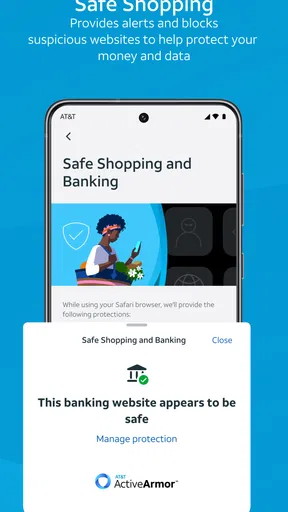
AT&T ActiveArmor® provides a variety of security features including spam call blocking, safe browsing, and identity monitoring. It also offers alerts for suspicious activities, secure Wi-Fi protection when connected to public networks, and real-time threat detection to ensure your device and data are safeguarded against potential cyber threats.
Does AT&T ActiveArmor® offer any free features or is it a paid service?
AT&T ActiveArmor® offers both free and premium features. The free version includes basic protections like fraud call blocking and safe browsing alerts. For more comprehensive coverage, such as identity monitoring and enhanced security options, a subscription to the premium version may be required. Check the app for specific pricing details.
How does AT&T ActiveArmor® protect against identity theft?
AT&T ActiveArmor® helps protect against identity theft by monitoring your personal information across the internet. It provides alerts if your data is found in suspicious activities or data breaches, allowing you to take immediate action. The app's identity monitoring feature is crucial in preventing unauthorized use of your personal information.
